The CRM for the AI you already use

Your AI does the talking. Zyflow keeps the record.

Tell Claude or ChatGPT what happened with a client. Zyflow files it on the right customer, has your AI ask when a name could mean two people, and each morning shows you who to call and who owes you.

Start free

Free plan. No card. Connect your AI in about two minutes.

Watch an undo

What is Zyflow?

Zyflow is a lightweight CRM for small businesses that sits underneath the AI you already use. Claude, Cursor, any MCP app, or ChatGPT on Business plans can look up customers, log calls, set follow-ups, track money owed, file documents and make invoices. Zyflow runs no AI of its own. It has your AI ask when a name is unclear, labels each change with the app that made it, and lets you undo it. One price for the whole team, and no AI credits.

Works with Claude · ChatGPT · Claude Code · Cursor · VS Code · Gemini CLI · Windsurf · any MCP app

Zyflow runs no AI of its own · Your AI’s calls are never billed · Export your records any time

Which AI plans work?
  • Claude: any plan. Claude Free allows one custom connector.
  • ChatGPT: Business, Enterprise and Edu plans, in developer mode, on the web (beta). An admin switches it on.
  • Claude Code, Cursor, VS Code, Gemini CLI and Windsurf: yes, each with a step-by-step guide.
  • Any other MCP app, or your own script: paste your Zyflow link, or use an API key.
  • The Gemini app isn’t supported yet. Gemini CLI is.

Checked October 2026.

A lightweight CRM your AI keeps up to date, in 3 steps

A lightweight CRM keeps the few things a small business checks every day: customers, deals, follow-ups and money owed. Zyflow stays light because you update it by talking to the AI app you already use. Say what happened in a sentence, and Zyflow files it on the right customer, labeled, with an Undo.

  1. Paste one link into your AI app.

    Add your Zyflow link to Claude, ChatGPT, Cursor or any app that supports MCP, the standard way AI apps connect to tools.

  2. Sign in and approve.

    Sign in, or create your free account, and choose the one workspace the app may use. It works like “Sign in with Google”: you never paste a password into your AI app.

  3. Talk.

    Tell your AI what happened: “Had a call with Maya at Northwind. She wants the revised quote by Friday.” Your AI logs the call and sets the follow-up on the customer you already have, then reads back the date: Fri, 9 Oct. The change shows up labeled, with an Undo.

About two minutes in Claude. On ChatGPT Business, an admin switches on developer mode first.

Mostly in one AI app? See Zyflow as a Claude CRM or a ChatGPT CRM.

A record that outlives the chat

When your client history lives in chat threads, follow-ups get buried and nobody can see who’s waiting. Zyflow keeps each customer’s calls, facts, follow-ups, money owed and paperwork in one record, and every AI app you connect reads the same one.

Each morning, one list

Today might show four follow-ups due, two payments to chase and one client who’s gone quiet. Ask your AI “What’s on my plate today?” and you get the same list. The 8am email brings your follow-ups and payments to chase to your inbox.
One memory for every AI app you connect

Your AI forgets between chats. Zyflow keeps the facts. Tell Claude that Maya prefers calls after 2pm, and Cursor can read it tomorrow.

Money owed, tracked and chased

Tell your AI “Northwind owes €4,800 and will pay by the 15th.” Zyflow records the balance, the promise date and one reminder to chase it. The reminder closes itself once the payment is recorded.

Invoices and quotes in one sentence

Say “Invoice Northwind for 3 workshop days at €1,200, plus 10% tax.” Zyflow does the math, not your AI. It numbers the invoice, works out the tax, files the PDF under the customer and gives your AI a download link to share with you.

Prefer to click? The same record lives in a full web app, with Today, contacts and a deals board.

You tell your AI what happened, or paste the thread. Zyflow doesn’t read your inbox, calendar or calls.

Let your AI write. Keep the final say.

Four guardrails sit on every AI write: Ask. Match. Label. Undo.

  1. Ask.

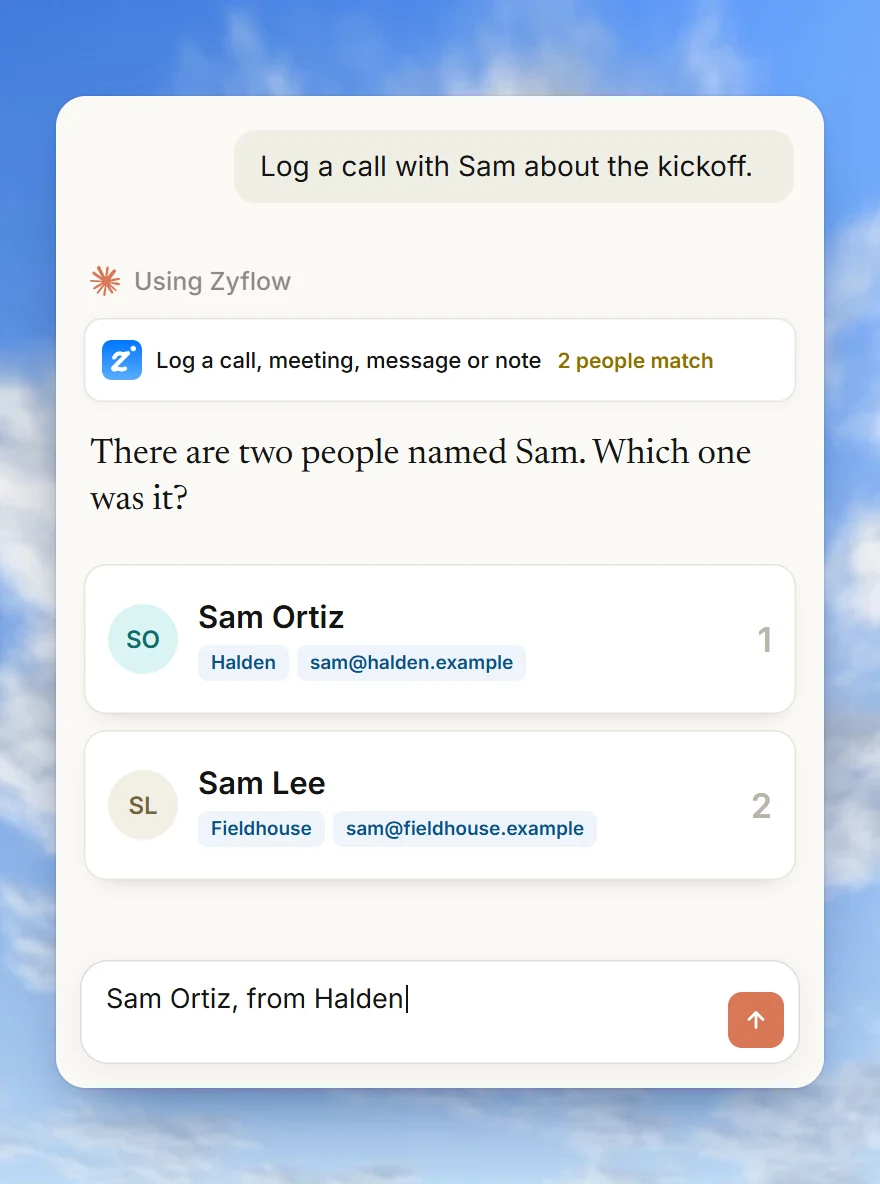
    When a name could mean two people, Zyflow sends your AI the candidates and what tells them apart, and your AI asks you which one you mean.

  2. Match.

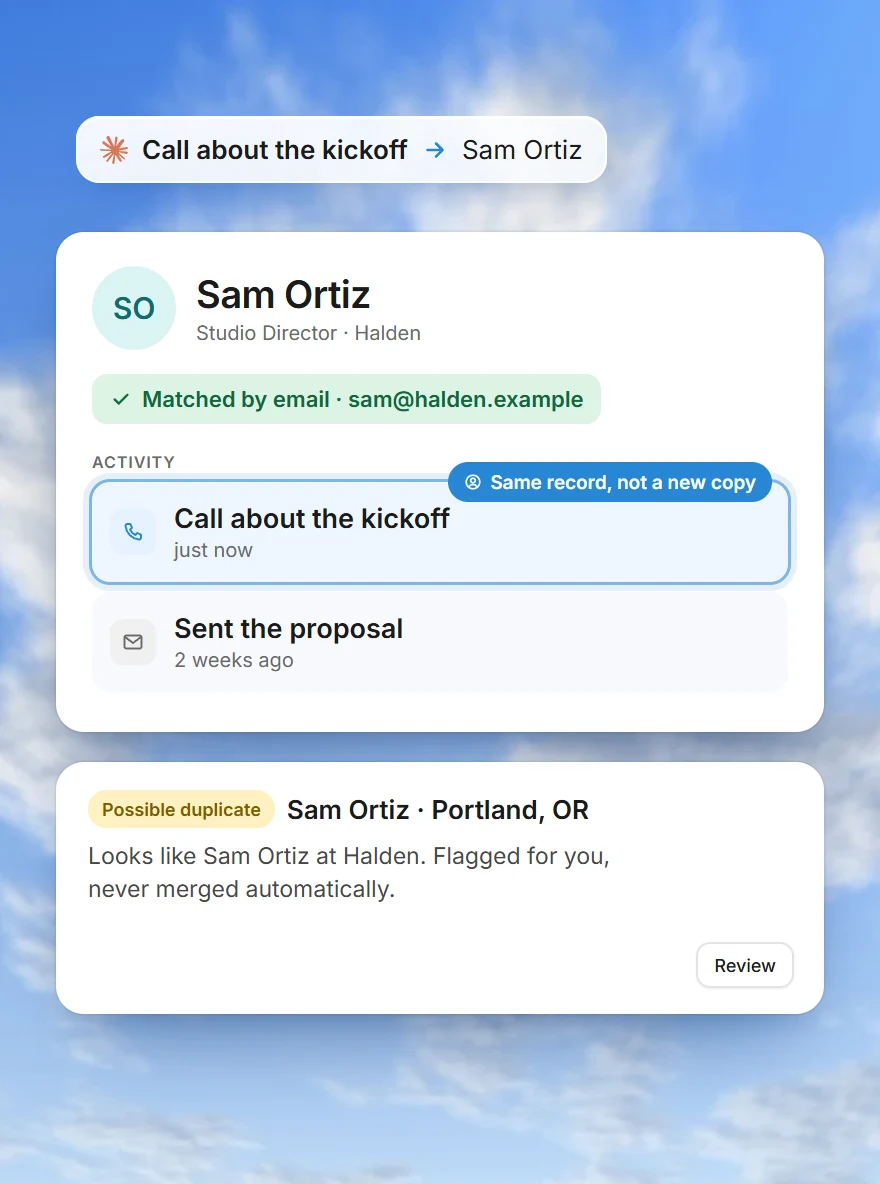
    Saves land on the record you already have, not a new copy. Similar names are flagged, never merged automatically.

  3. Label.

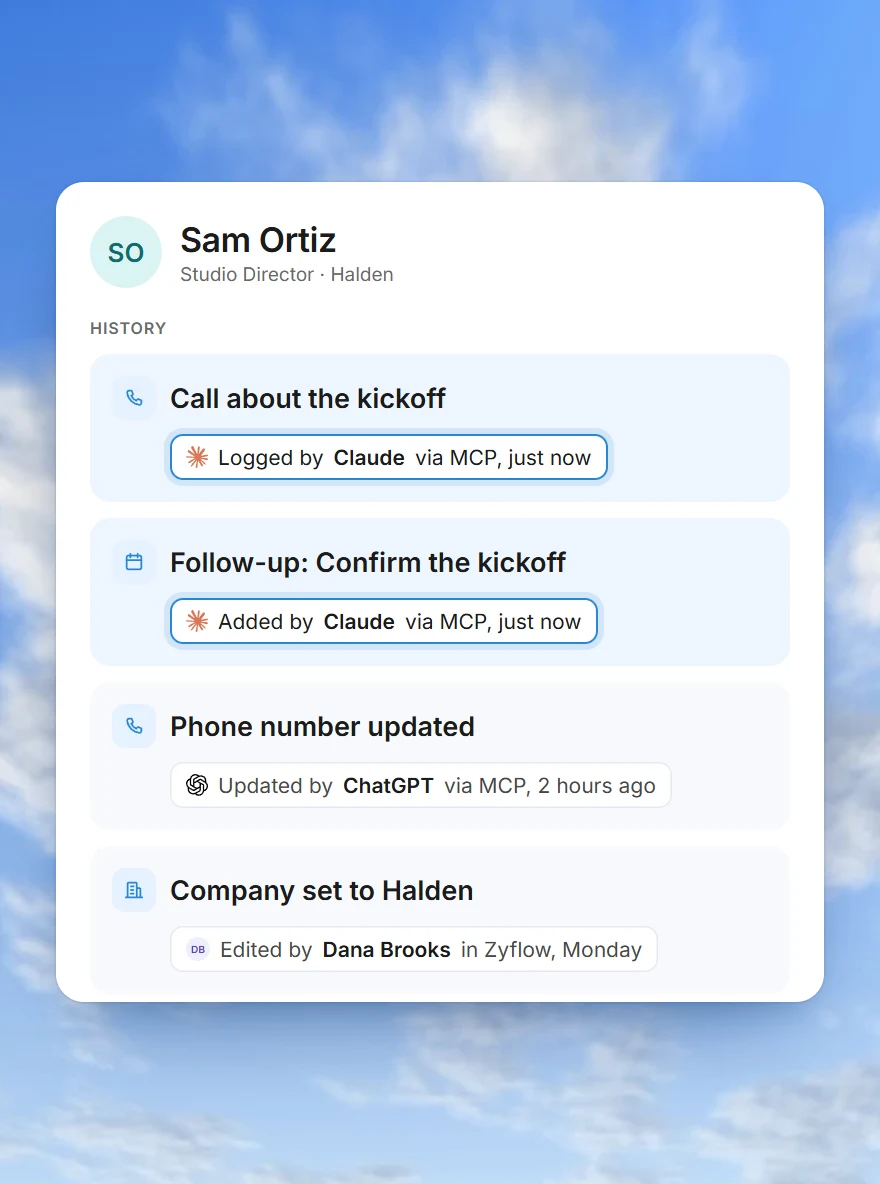
    Every change carries the name of the app that made it: “Added by Claude via MCP”.

  4. Undo.

    Each thing your AI does is one change, and one click undoes it, even 40 contacts edited at once.

Your AI will get things wrong sometimes. Plan for that.

A person relaxing with their phone beside the “What your AI did” card in Zyflow CRM: in the last 24 hours Claude made 6 changes and Cursor 2, each with an Undo
“What your AI did” on Today lists the last 24 hours, app by app. Open a line to see each change, with an Undo.

Your AI, paid for once

Your AI’s calls to Zyflow are never billed, so you don’t pay for your AI twice. Zyflow has a Free plan with no card and no time limit, and paid plans are one price for the whole team, not per person.

Why it costs less:

Zyflow runs no AI, so it has no AI costs to pass on and nothing to meter.

No hidden costs:

no onboarding fee, no seat minimum, no AI credits and no overage charges.

Switch from Claude to Cursor and keep every customer’s history, because every app you connect reads the same record. Disconnect any app in one click, and its access ends right away. Export your records, documents and history any time.

Your AI app’s own plan and usage limits still apply.

Don’t build a CRM for Claude. Connect one.

Who is Zyflow for?

Zyflow is a CRM for small, owner-run businesses that sell their expertise and already work in an AI app every day.

  • A laughing freelance designer beside quote QT-0004 for Kestrel, €2,400, with a link to copy

    Freelancers

    Tell your AI “Quote Kestrel €2,400 for the logo refresh.” Zyflow numbers the quote, files it under Kestrel and gives you a link to send.

  • A consultant beside Zyflow’s answer about Northwind: 1 open deal, 2 follow-ups, €4,800 owed, 3 files

    Consultants

    Before a call, ask your AI “What do we know about Northwind?” and get the facts, open deals, follow-ups, money owed and files in one answer.

  • A business owner with a morning coffee beside Today in Zyflow: 3 people waiting on you, 2 who owe you

    Solopreneurs

    No time for CRM homework? Tell Claude what happened after each call. The next morning, Today shows who’s waiting and who owes you.

Not a fit if...

Zyflow isn’t a fit yet if you need email or calendar sync, card payment collection, SSO or two-factor sign-in, a home for regulated data such as patient records, or more than 30 people.

Questions before you connect your AI

Is Zyflow an AI CRM?

Not in the usual sense. Zyflow is a lightweight CRM that runs no AI of its own. The AI is the app you already use, such as Claude, Cursor or ChatGPT on Business plans. Your AI talks and asks. Zyflow keeps the record, labels each change and does the invoice math.

I already pay for Claude or ChatGPT. Why pay for another tool?

You aren’t paying for more AI. Zyflow is the record your AI is missing. Free costs nothing, your AI’s calls to Zyflow are never billed on any plan, and paid plans are one price for the whole team. Your AI app’s own usage limits still apply.

Will my AI write wrong things or make duplicates?

Sometimes it will. To avoid duplicates, a save updates the customer already on file, and an email or phone only counts as a match when the names agree. Every change is labeled, so a wrong one is easy to spot and undo.

What if my AI makes a bad change or deletes something?

Undo it in Zyflow with one click, or tell your AI “undo what you just did.” An undo can itself be undone. AI apps can only move things to a 30-day trash, issued invoices can only be voided, and bulk changes show a preview first and stop at 200 records.

Lots of CRMs connect to Claude now. What’s different?

The difference is what happens when your AI writes. Ask any CRM three questions. Is each AI change labeled with the app that made it? Can you undo it in one step? Is your AI told to ask before it guesses? Zyflow does all three, with invoices, quotes, files and money owed in the same record.

Does Zyflow read my email or calendar?

No. Zyflow doesn’t sync email, calendars, calls or WhatsApp. Tell your AI what happened, or paste the thread, and your AI files the calls, facts, follow-ups and money owed after showing you what it found. If your AI app has its own email connector, it can read a thread there and log it to Zyflow.

Will it work with my AI, on my plan?

Claude works on every plan, and Claude Free allows one custom connector. ChatGPT can write to Zyflow in developer mode on Business, Enterprise or Edu plans. Claude Code, Cursor, VS Code, Gemini CLI and Windsurf each have a step-by-step guide, and any MCP app can use your Zyflow link.

Your AI talks. Zyflow remembers.

Tell your AI what happened. Zyflow keeps the record.

If your AI gets something wrong, undo it. If Zyflow isn’t for you, export your records, documents and history.

Start free

Free plan. No card. Connect your AI in about two minutes.